

A developer account requests a certificate from a template called LegacyApp-CodeSign. The template was set up in 2018 for an internal CI system. It lists one EKU: Any Purpose. The CA issues the certificate.
What the developer now holds is, cryptographically, a code-signing certificate. It is also a client authentication certificate. A server authentication certificate. A Smart Card Logon certificate. The Any Purpose EKU is exactly what it sounds like: any purpose, the wildcard of EKUs.
The developer didn't want to sign code. They wanted a certificate that could do anything, and the template was happy to provide one.
This is ESC2. It was published in 2021 in Will Schroeder and Lee Christensen's Certified Pre-Owned research at SpecterOps, alongside ESC1. The two are often grouped together and they share most of their conditions, but they're different problems. ESC1 is about who the certificate claims to be. ESC2 is about what the certificate can do. A defender who treats them as the same thing will miss half of what each one actually enables.
This article is for the defender. It covers what ESC2 is, why both of its variants end up in production environments by accident, the prevention discipline that makes most of the cleanup unnecessary, and how to find and fix the configurations already in your environment.
I'm assuming you've read the ESC1 article. All the detection tooling, the nested-group expansion, the scaling story is there and I'm not going to rewrite it here. Where ESC2 needs the same machinery, I point back rather than duplicating.
I won't walk through exploitation. The SpecterOps research covers it, Certipy and Certify document the tooling. Use those when you need to show leadership the attack. Use this when you need to find it and fix it.
What ESC2 actually is
ESC2 has four conditions, and it comes in two variants that differ on the first one. Three of the four conditions are the same as ESC1.
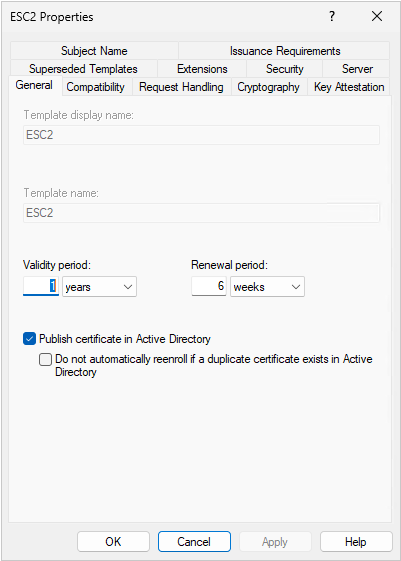
In the BrkrOps lab we have a template called ESC2 configured to meet all four conditions of the Any Purpose variant. The screenshots below reference it.
Condition 1; Unrestricted purpose.
This is the condition that makes ESC2 what it is. The template's EKU configuration falls into one of two patterns.
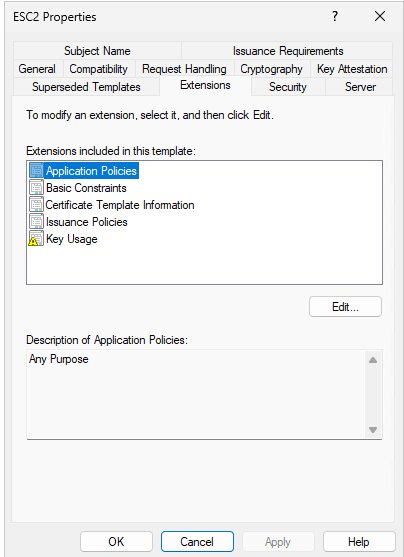
Variant A (Any Purpose). The template's Application Policies include OID 2.5.29.37.0, "Any Purpose." A certificate issued from this template is valid for any standard purpose: client auth, server auth, code signing, Smart Card Logon, secure email, IPsec, document signing. The EKU is, by definition, a wildcard.
In the lab template, the Extensions tab shows one entry: Any Purpose. No Client Authentication. No Server Authentication. Any Purpose includes both of those implicitly, and everything else besides.
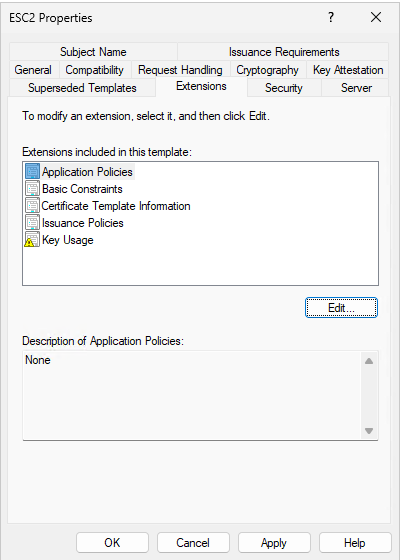
Variant B (No EKU, "SubCA"). The template has no EKUs at all. The X.509 spec interprets an empty EKU list as no restriction, and a certificate without EKUs can act as a subordinate CA, capable of signing its own certificates with whatever EKUs and whatever subjects the holder chooses.
These look similar on paper. They aren't. Variant A gives an attacker a versatile end-entity certificate. Variant B gives them a small unauthorized CA.
One terminology point that trips people up. "Any Purpose" appears in two places in Windows certificate management and they mean different things. As an EKU value (2.5.29.37.0) inside an issued certificate, it's the wildcard above. As an entry in the Application Policies list of the template editor, it's the configuration choice that puts the EKU into issued certificates. The UI label is the same. The thing being labeled isn't.
Conditions 2, 3, and 4; Enroll, no approval, no signatures.
The remaining conditions mirror ESC1's permission and issuance-requirement structure:
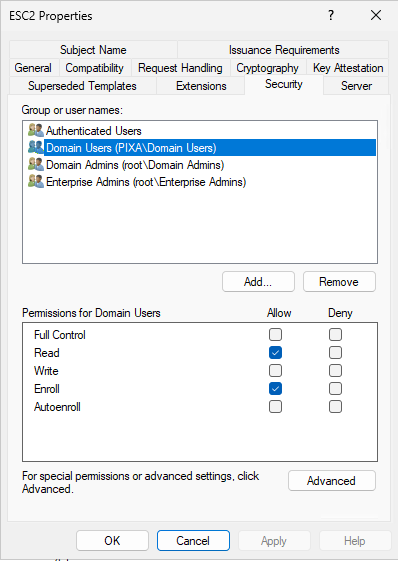
- A low-privilege user has Enroll permission, directly or through nested group membership.
- Manager approval is not required (
CT_FLAG_PEND_ALL_REQUESTSis absent frommsPKI-Enrollment-Flag). - Authorized signatures are not required (
msPKI-RA-Signatureis zero).
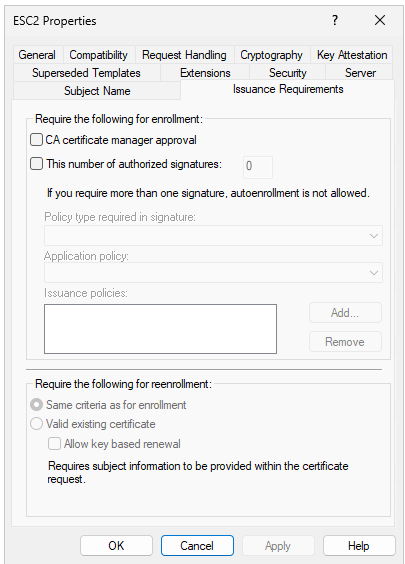
The first two are covered in the ESC1 article. The third doesn't appear in ESC1. When msPKI-RA-Signature is non-zero, requests have to be co-signed by an Enrollment Agent certificate before the CA will issue. That kills ESC2 because the attacker doesn't have an Enrollment Agent cert. Getting one is its own attack path (ESC3). For most templates this value is zero by default and nobody changes it.
In the lab template, all three conditions are satisfied. The Security tab grants Enroll to Domain Users. The Issuance Requirements tab has neither checkbox set.
The relationship to ESC1.
ESC2 isn't a flavour of ESC1. The differences matter:
ESC1 needs the enrollee-supplies-subject flag. ESC2 doesn't. The attacker isn't impersonating anyone; they're just using a certificate that can do more than the template's name implies.
ESC1 produces a certificate that authenticates as someone else. ESC2 produces a certificate that authenticates as you but also signs code, terminates TLS, and authenticates to non-Kerberos systems.
A template can be both at once. Any Purpose plus enrollee-supplies-subject is strictly worse than either alone. Certify and Certipy will flag this as ESC1+ESC2.
How the attack works
Variant A: Any Purpose EKU.
Discovery is the same as ESC1: enumerate the templates in the configuration partition, read the EKU lists, flag the ones with Any Purpose. Any authenticated user can do this.
Enrollment is unremarkable. The attacker requests a certificate from the template using their own account. The subject is built from AD. The CA has no basis to refuse since the user has Enroll permission and the template doesn't require approval. The certificate comes back issued in the attacker's name.
The misuse step is where ESC2 differs from ESC1. The attacker isn't going to use this certificate to authenticate to a domain controller as Administrator. They're going to use it for whatever the certificate's EKU permits, which is everything. Sign code that will pass Authenticode validation. Stand up a service with a legitimately-signed TLS certificate. Authenticate to anything that accepts client certificates and validates against the trusted root.
On a fully-patched 2026 environment with strong certificate mapping in enforcement mode (KB5014754), the cert can't easily be used to spoof identity to a DC, the SID extension binding prevents that. The cert's other capabilities are untouched. Code signing trust still works. Mutual TLS still works. ADFS and SAML still validate the chain.
Variant B: No EKU.
Same discovery, same enrollment. Different outcome on the back end.
A certificate without an EKU can sign other certificates. The attacker doesn't have to go back to the corporate CA for anything else; they use their private key to mint certificates with whatever EKUs and subjects they want. They become a small CA inside the environment.
There's an important limit. The attacker's rogue SubCA isn't in NTAuthCertificates, so certificates issued by it can't be used for domain authentication. PKINIT against a DC will fail. This is the part that gets cited as "Variant B is mostly contained," and in a Kerberos-only world, it would be.
But most environments aren't Kerberos-only. SAML doesn't check NTAuthCertificates. ADFS doesn't. IPsec doesn't. Most enterprise applications that accept client certificates validate the chain and stop there. For an environment running federated identity or service-to-service mTLS, a rogue SubCA is more dangerous than an ESC1 PKINIT abuse, not less.
Why each step works.
There's no bug here. The directory exposes template configuration to authenticated users so auto-enrollment works. The CA issues what its templates permit. Certificate validation accepts Any Purpose as valid for any purpose. Each component is doing exactly what it was built to do. The vulnerability is in the choice to publish such a template where low-privilege users can enroll.
The prevention you should have had
Everything above is the cleanup story. The prevention story is shorter and, if you apply it from day one, it makes most of the cleanup unnecessary.
Two principles.
Publish only what you actively use.
Templates are an attack surface only when they're published. A template in the configuration partition that isn't on any CA's issued list can't be enrolled in. It's inert.
The discipline is to keep the issued list short and tied to documented operational needs. Every published template should be clearly defined in the CP and CPS of the organisation. Templates that no longer serve an active need should be unpublished and removed from the policy and governance documents. Templates that might be needed someday should not be published until that day arrives.
You cannot be vulnerable to ESC2 on a template you have not published. The four-condition analysis becomes a quick check against a short list, not an archaeological dig through years of accumulation.
Work toward deleting the defaults.
Default templates exist in the configuration partition because ADCS installed them, not because anybody asked. They aren't published by default. They are available to be published, by anyone with the rights to add a template to a CA's issued list, in two clicks.
The defaults are V1 schema. Broad permissions, broad EKUs. The moment one of them is published, it's attack surface. The mistake is easy to make and the cost is immediate.
The fix is to delete them. Carefully. Some of the defaults are dependencies (the SubCA template is referenced by ADCS itself during certain operations), the User template is sometimes expected by legacy automation, vendor PKI appliances may look for specific template names. Don't delete them all at once and discover the breakage. Eliminate dependencies first, then delete.
The process for most organizations:
- Inventory every default template currently in the configuration partition.
- For each, find out whether anything actively uses it. Published on any CA? Referenced by any GPO? Expected by any application or appliance? Required by any vendor integration?
- Default templates with no dependencies: delete them.
- Default templates with dependencies: replace the dependency with a properly-scoped custom template, then delete the default.
Most enterprises have fifteen to thirty defaults to work through. The dependency analysis is mechanical once you have the inventory. The payoff is permanent. A default that doesn't exist can't be accidentally published.
The SubCA template specifically.
The Subordinate Certification Authority template is the most dangerous default to leave published and the one I see published most often.
It's there to issue certificates to actual subordinate CAs when you're building out a multi-tier hierarchy. That's a project. It happens on a schedule, by a known administrator, during a planned window. It is not something anyone needs to do on demand.
The correct configuration: SubCA unpublished by default, published only during the rollout of a new subordinate CA, unpublished again when the rollout is done. The window during which it's available for enrollment is measured in minutes. The window during which it should be available to anyone but a specific tier-zero admin is zero.
If the SubCA template is published anywhere in your environment right now and you don't have an active subordinate CA deployment in progress, unpublish it before you finish reading this article. It's the single highest-impact change you can make for ESC2 Variant B and it costs nothing.
Why this is everywhere
ESC2 turns up in almost every PKI assessment I've done. The prevention principles above are the discipline that would have stopped each of these from happening. They happen because the discipline wasn't applied.
The "we don't know what they'll use it for" template. A team asks for a template for "general internal use" and proposes Any Purpose because they don't want to come back later asking for changes. The admin agrees because the alternatives feel like more work for the same outcome. Years later, a different team gets Enroll permission on the same template. The original team is gone. The current team has no idea what Any Purpose means; they just know the template works.
Templates duplicated from a template that had Any Purpose. Someone copied an existing template to solve a different problem, intending to scope the EKUs down later. Later didn't happen. The duplicate inherits the wildcard and gets published.
The SubCA template that got published by accident. Someone working through a CA setup wizard published it by mistake. Or someone with broader rights than they understood added it to the issued list deliberately, thinking it was something else. Once it's published, nobody looks at it again. It sits there.
Test templates that became permanent. Every PKI rollout produces test templates with broad EKUs and broad permissions, because the test was about whether issuance worked, not about whether it was constrained. The deployment goes live. The test templates don't get unpublished. The admin who created them moves on.
Build pipelines. A build team asks for a code-signing template. The pipeline needs the cert for signing, but also for TLS during artifact upload, and the certificate library doesn't gracefully handle EKU restrictions, and someone enabled Any Purpose during initial troubleshooting and never came back to tighten it. Now the template mints Any Purpose certificates on demand, accessible to any service account that's a member of the broad enrollment group.
Why nobody catches any of this: Any Purpose looks like one line in the Extensions tab. It doesn't say "this template can be used as a client auth certificate." It says "Any Purpose." A reviewer who doesn't know the EKU model sees a one-line entry and moves on. The No-EKU variant is even quieter: a template with no EKUs looks like a configuration that hasn't been filled in yet, not one that intentionally permits anything.
Detecting ESC2 in your environment
Before the four-condition analysis, ask a simpler question: is the template published, and does it need to be? Most environments will close more findings from that question than from any configuration check. Anything published without a documented owner, use case, and consumer list is either an unpublishing candidate or a missing-documentation finding.
For templates that are legitimately published, the configuration checks below apply.
certutil for a known template.
certutil -dstemplate LegacyApp-CodeSignThe fields that matter:
pKIExtendedKeyUsage: look for OID2.5.29.37.0. Present means Variant A. Missing or empty means Variant B.msPKI-Enrollment-Flag: absence ofCT_FLAG_PEND_ALL_REQUESTS(0x2) means no manager approval. Condition 3.msPKI-RA-Signature: value of 0 means no signature required. Condition 4.nTSecurityDescriptor: the ACL. Same analysis as ESC1.
Unlike ESC1, you don't check msPKI-Certificate-Name-Flag. ESC2 doesn't need enrollee-supplied subject; the template can build the subject from AD and still be ESC2.
PowerShell enumeration across the forest.
This identifies templates matching the first three machine-readable conditions in either variant. The Enroll permission check is Approach 3, which uses the function from the ESC1 article.
# Find candidate ESC2 templates in the current forest.
# Detects both variants: Any Purpose EKU and No-EKU (SubCA).
# Server 2022 native. Read-only.
# Requires: ActiveDirectory module (RSAT).

Set-StrictMode -Version Latest
$ErrorActionPreference = 'Stop'
Import-Module ActiveDirectory

$configNC      = (Get-ADRootDSE).configurationNamingContext
$templatesPath = "CN=Certificate Templates,CN=Public Key Services,CN=Services,$configNC"

$anyPurposeOID = '2.5.29.37.0'

$templates = Get-ADObject -SearchBase $templatesPath `
    -LDAPFilter '(objectClass=pKICertificateTemplate)' `
    -Properties name, displayName, 'msPKI-Enrollment-Flag',
                'msPKI-RA-Signature', pKIExtendedKeyUsage

$candidates = foreach ($t in $templates) {
    $enrollFlag = if ($t.'msPKI-Enrollment-Flag') { [int]$t.'msPKI-Enrollment-Flag' } else { 0 }
    $raSigs     = if ($t.'msPKI-RA-Signature')    { [int]$t.'msPKI-RA-Signature' }    else { 0 }
    $ekus       = @($t.pKIExtendedKeyUsage)  # Multi-valued; @() handles null

    $requiresApproval = ($enrollFlag -band 0x2) -ne 0  # CT_FLAG_PEND_ALL_REQUESTS
    $hasAnyPurpose    = $ekus -contains $anyPurposeOID
    $hasNoEKU         = ($ekus.Count -eq 0)
    $requiresSigs     = $raSigs -gt 0

    $variant = $null
    if ($hasAnyPurpose) { $variant = 'A: Any Purpose EKU' }
    elseif ($hasNoEKU)  { $variant = 'B: No EKU (SubCA)' }

    if ($variant -and -not $requiresApproval -and -not $requiresSigs) {
        [PSCustomObject]@{
            Name              = $t.name
            DisplayName       = $t.displayName
            Variant           = $variant
            ManagerApproval   = $requiresApproval
            AuthSigsRequired  = $requiresSigs
            EKUCount          = $ekus.Count
        }
    }
}

if ($candidates) {
    Write-Host "Templates meeting 3 of 4 ESC2 conditions:" -ForegroundColor Yellow
    $candidates | Format-Table -AutoSize
    Write-Host ""
    Write-Host "For each template above, run Expand-EnrollPrincipals to evaluate Enroll permission."
} else {
    Write-Host "No templates in this forest meet the first three ESC2 conditions." -ForegroundColor Green
}
The Subordinate Certification Authority template will show up in this output if it's published. The answer for that template is almost never "remediate the configuration." It's "unpublish it."
Enroll permission analysis.
Expand-EnrollPrincipals from the ESC1 article works here without changes. Same extended right (0e10c968-78fb-11d2-90d4-00c04f79dc55), same broad SIDs, same recursive expansion. Run it against each candidate the script above returns.
The multi-forest scaling problems described in the ESC1 article apply to ESC2 too. I'm not going to rehash them.
One ESC2-specific gotcha: the script will surface SubCA and Cross Certification Authority as Variant B candidates when they're published, because they legitimately have no EKUs. Whether they're a finding depends on whether they should be published at all. If they are and you don't have an active rollout, the finding is the publishing.
Remediating ESC2
The cleanest fix removes the template from the issued list entirely. That's where to start.
Unpublish if it isn't actively used.
Before touching any configuration, ask whether the template serves a documented operational need. If it doesn't, unpublish it. The change is reversible, existing certificates aren't affected, and the attack path closes immediately.
If the template is a default; SubCA, User, Computer, WebServer, any of them, unpublishing is the start. Work toward eliminating the dependencies, then delete it. A default that doesn't exist can't be accidentally republished.
For the SubCA template specifically: unpublish it now if it's published and there's no active subordinate CA deployment. There's no steady-state configuration where this template should be on the issued list.
Replace Any Purpose with what's actually needed.
For Variant A templates that need to stay published, remove Any Purpose and add the specific EKUs the consumers actually use. This means a conversation with the team that owns the template. Find out what they really need; Code Signing, Server Authentication, Client Authentication. Don't fall into the trap of going the easy route. If we keep doing that, it won't take long until everyone is Domain Admin.
In the lab, the original template had Any Purpose. The hypothetical owner uses it for mutual TLS between internal services. The remediation removes Any Purpose and adds Client Authentication and Server Authentication.
The hard part isn't the change. It's the conversation. Teams that originally asked for Any Purpose because they didn't know what they'd need often still can't articulate it. When that happens, err toward fewer EKUs. Add capability only when something specific breaks.
For Variant B templates, don't try to retrofit them with EKUs. If a template has no EKUs, it was almost certainly meant to issue subordinate CA certificates or it was a misconfiguration. Unpublish.
The other levers, briefly.
The ESC1 article covers these in detail. The ESC2-relevant notes:
Scoped Enroll permissions apply the same way. Templates that stay published should grant Enroll to a dedicated group with explicit membership. Not Authenticated Users, not Domain Users, not Domain Computers.
Manager approval is appropriate for templates that issue rarely. It's not viable for high-volume self-service templates.
Authorized signatures (msPKI-RA-Signature set to one or more) require requests to be co-signed by an Enrollment Agent certificate. This is the strongest configuration-level mitigation for sensitive templates that are used only by administrators.
Strong certificate mapping (KB5014754) in enforcement mode closes ESC2's domain-authentication path. It does nothing about code signing, server auth, mutual TLS, SAML, ADFS, or anything else that validates the chain without going through Kerberos. In a 2026 patched environment, the DC-impersonation risk is largely handled. The skeleton-key risk isn't.
What the lab template ended up with.
For the ESC2 lab template:
- Any Purpose removed, replaced with Client Authentication and Server Authentication.
- Authenticated Users removed from Enroll, replaced with a dedicated group whose membership is the specific service accounts that need to enroll.
- The CA is patched with KB5014754 and runs in enforcement mode where the environment supports it.
For SubCA and other Variant B templates, the answer is in the prevention section above. Unpublish, work toward deletion, don't retrofit.
The reality at scale
The ESC1 article covers the multi-forest, hundreds-of-templates, continuous-program reality. The same dynamic applies to ESC2.
The thing that changes when you apply the prevention principles is the size of the problem. An environment that publishes thirty templates and has deleted every default it doesn't need has a much smaller attack surface than one that publishes a hundred and twenty templates with all the defaults still sitting in the configuration partition. The continuous review still has to happen. There's just less to review.
How Truvald handles this
Truvald enumerates every certificate template across every CA in every forest it has access to, evaluates the ESC2 conditions for both variants, expands Enroll permissions across nested groups and forest trusts, and produces a list of templates that meet all four conditions. It runs the same analysis for ESC1, ESC3 through ESC16, and the broader set of CA configuration, PKI object ACL, and GPO settings.
For ESC2 specifically, Truvald distinguishes between the two variants, flags published defaults as candidates for the deletion roadmap, and reports separately on templates that are configured for ESC2 but not currently published. The latter is useful for environments working toward the publish-only-what-you-use discipline; it tells you what's lurking that you don't want to accidentally publish later.
Output is a written assessment report. Word format. Every finding, severity, specific template, specific misconfiguration, recommended remediation, residual risk. Suitable for technical teams and for the exec summary the technical team has to write.
Truvald runs inside the customer's network. No cloud, no telemetry, no data leaves. The template configurations and CA settings being assessed are among the most sensitive material in an enterprise environment. Truvald is built so BrkrOps never sees any of it.
Free 30-day evaluation at truvald.ca. For organizations that want the work delivered as an engagement with BrkrOps running it in your environment, producing the report, walking your team through the remediation roadmap then the Truvald + Assessment package combines the license with three days of consulting.
References
- Will Schroeder and Lee Christensen. Certified Pre-Owned: Abusing Active Directory Certificate Services. SpecterOps, June 2021.
- SpecterOps documentation on ESC2.
- Microsoft [MS-CRTD]: Certificate Templates Structure.
- Microsoft KB5014754: Certificate-based authentication changes on Windows domain controllers.
- The ESC1 defender's guide (companion article). Detection tooling, nested-group expansion, scaling.
Next in this series: ESC3 — when a template lets you enroll for someone else. The Certificate Request Agent EKU, on-behalf-of enrollment, how it chains with the User template to mint domain admin certificates directly, and why the authorized-signatures requirement matters when applied to the right templates.